Some of the worst problems in an online shop make no noise at all. Nothing crashes. No error appears. A customer simply can’t buy something, gives up and leaves, and you never find out why.
In a catalogue like DesignMint Commerce’s, that kind of quiet breakage is called drift. Products come in from several suppliers, get copied into microstores and are priced in three currencies. Over time, small things slip. A product loses its print locations. A store isn’t linked to a warehouse, so its checkout can’t ship. A variant has a US dollar price but no Australian one. The health page finds that drift and fixes it.
What a check looks like
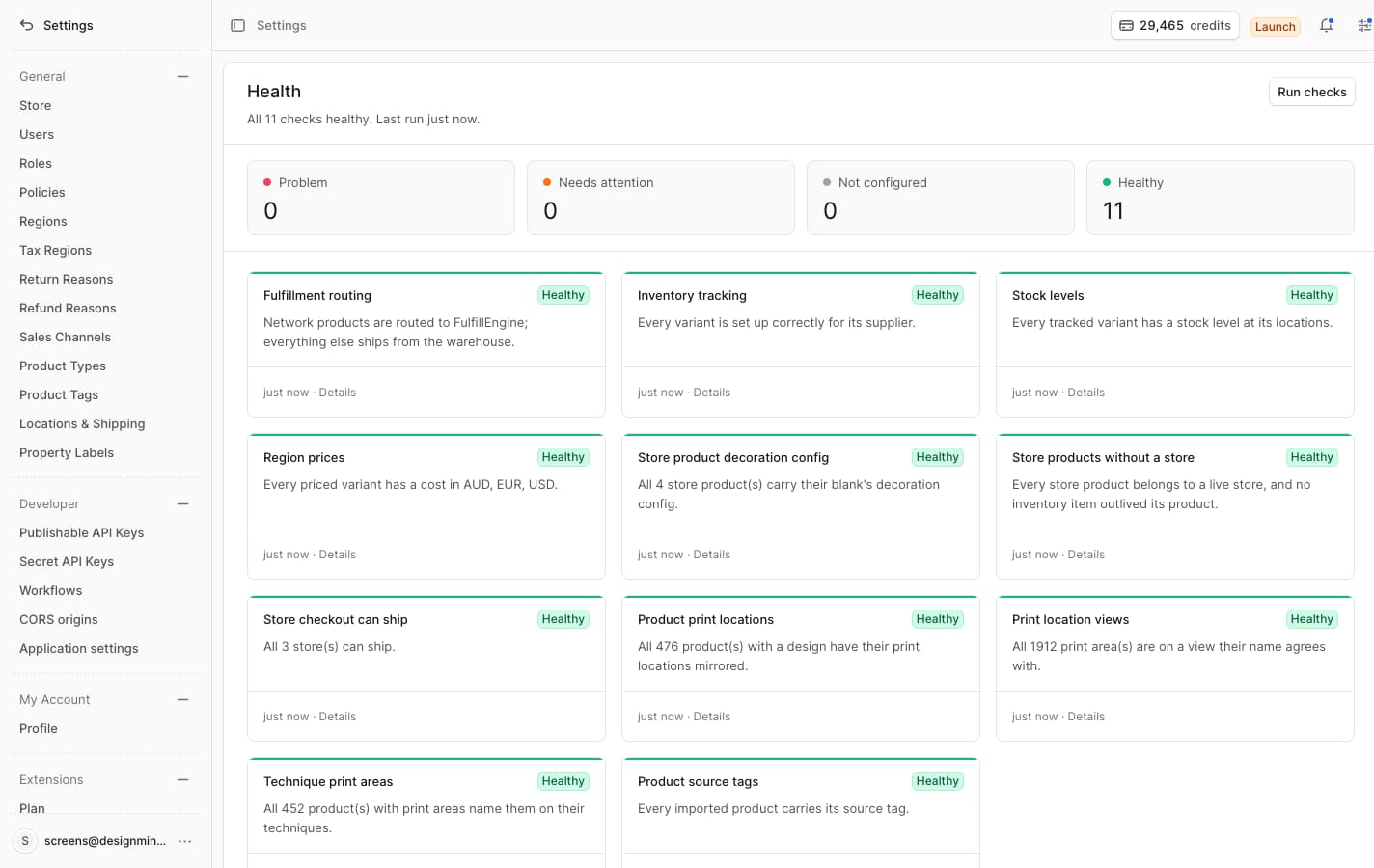
Each of the eleven checks asks one question about your catalogue, such as “can every store’s checkout actually ship?” or “does every priced variant have a price in AUD, EUR and USD?”. For each one, the page tells you three things in plain language: what breaks for a customer, how many products, stores or variants are affected, and where to fix it by hand.
- What breaks for a customerCustomers can’t finish checkout. The store isn’t linked to a warehouse, so it can’t ship.
- How many are affected1 store affected
- Where to fix it by handFix by hand: link the store to a warehouse.
The checks are ordered by how much damage they do. Fulfilment routing and stock come before tags, because a missing tag is untidy, but a store that can’t ship is lost money.
The rules every check follows
- Checks only look; they never change anything. A repair is always a separate, deliberate click.
- Every repair is safe to run twice. Clicking it on a catalogue that is already healthy does nothing.
- All the checks run at the same time, and if one of them hits an error, it shows “error” without hiding the results of the others.
- 01Only looksRun the check again
On the server, before anything changes.
Already healthyNothing happens - 02Safe to run twiceRepair
Fixes what the check found.
- 03Only looksRun the check once more
The same question, after the fix.
Still failingDoesn’t count as fixed - Counts as fixedThe check shows Healthy again.
If we had to recommend one rule to anyone building admin tools, it’s this one: don’t trust a fix until the thing it fixed says it’s fixed.
What it isn’t
The health page isn’t for one-off changes that should happen once, when we release an update. Those belong in a migration script that runs during the release. Health is for problems that can come back tomorrow: a new supplier import, a new store, a new currency.
Why this matters for a decoration shop
When all eleven checks are green, a shop owner knows that every product with a design has its print locations, every store can take an order and ship it, and every price exists in every currency they sell in. On our test catalogue that meant 476 products with matching print locations, 1,912 print areas on the right product views, and every store able to ship. That’s a lot of small things nobody has to check by hand.
What we learned
- Silent failures need active checks. If something won’t show an error, go looking for it.
- Order problems by what they cost the customer, not by when you found them.
- A repair that can’t prove itself is just a guess.
Common questions
What is catalogue drift?
Small inconsistencies that build up over time, like missing prices, missing print areas or unlinked warehouses. They don’t cause errors, but they stop customers from buying.
Is it safe to click repair?
Yes. A repair only runs if the check still fails, it’s safe to run twice, and it only counts as done when the check passes afterwards.
How often should I run the checks?
Whenever something big changes, like a supplier import or a new store, and any time a customer tells you they couldn’t buy something.