DesignMint Commerce, our hosted storefront and admin, is built on Medusa, an open-source commerce engine. (The DesignMint Studio SDK is a separate product: a React SDK that works with any backend.) Medusa gives Commerce a solid base: orders, products, payments and inventory. But out of the box it looks and feels like a general toolkit, organised the way a developer thinks. A decorator thinks in shops, print areas, suppliers and jobs.
This case study is about the work that closes that gap: reshaping the admin, connecting the outside services a decoration business depends on, and building a credit wallet that pays for the heavier features fairly.
An admin organised the way a decorator thinks
The sidebar is grouped by how people actually work: My Storefront (with Shop and Stores inside it), System (decoration pricing, markup, exchange rates, inventory defaults, tax codes and emails), Suppliers & Decorators, and then the tools.
One rule shaped more of the product than you’d expect. The sidebar only shows two levels, and a third level simply doesn’t appear. That’s why editing a microstore opens in a window instead of on its own page, and why Shopify Sync lives inside each store. Working with the platform’s limits, instead of fighting them, kept the admin predictable.
Branding took a few creative workarounds. The login, invite and password-reset screens offer no way to customise them, so a small invisible add-on loads a stylesheet that swaps in our logo on all three. About 25 bits of text were changed so the admin says “DesignMint” instead of “Medusa”. And the top bar hides menu items you can’t use, based on your role, your plan and the services you’ve connected.
An integration hub for 60 providers
A decoration business runs on outside services: payments, tax, shipping labels, file storage, suppliers, decorators and email. The integration hub is the one page where you connect them. It lists 60 providers: 19 are live today, and the rest, including every tax provider, are marked “coming soon”.
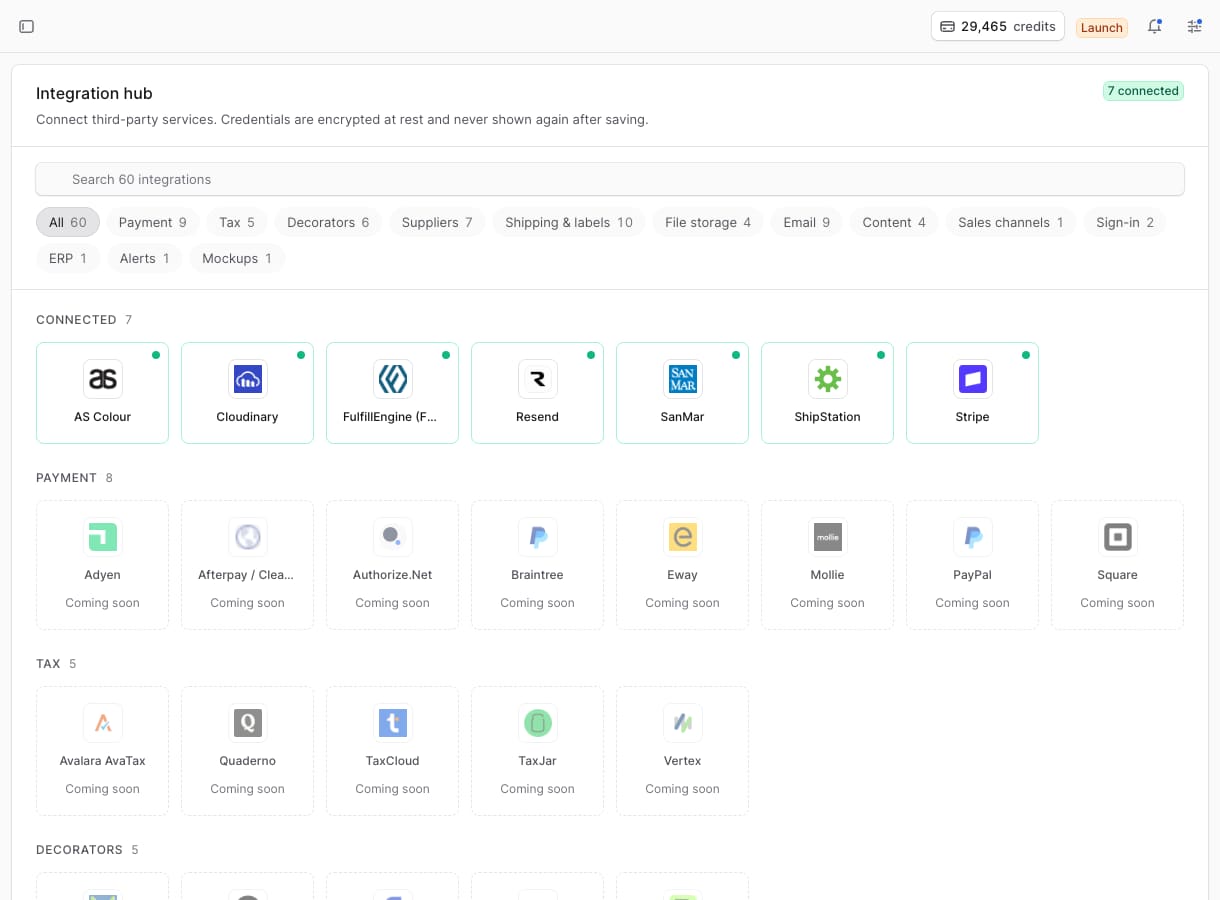
- Login details are encrypted with AES-256-GCM and never shown again after you save them.
- Some categories allow one provider at a time, because you only need one email service. Others stack, because you might work with several suppliers and shipping carriers.
- A provider is only marked “live” when real code actually uses it. Brandfetch and Logo.dev stayed as “coming soon” because nothing called them yet. We’d rather show fewer live integrations than promise ones that don’t work.
The first nine providers we connected (Stripe, Resend, ShipStation, GCS, S3, Cloudinary, local storage, FulfillEngine and Slack) are deliberately left alone. New providers are built next to them, not by rewriting them. We learned that one the honest way: we refactored the Resend email integration, tested it, saw it worked, and rolled it back anyway. Changing something that already works carries risk, and the improvement wasn’t worth it.
A credit wallet that can’t be overdrawn
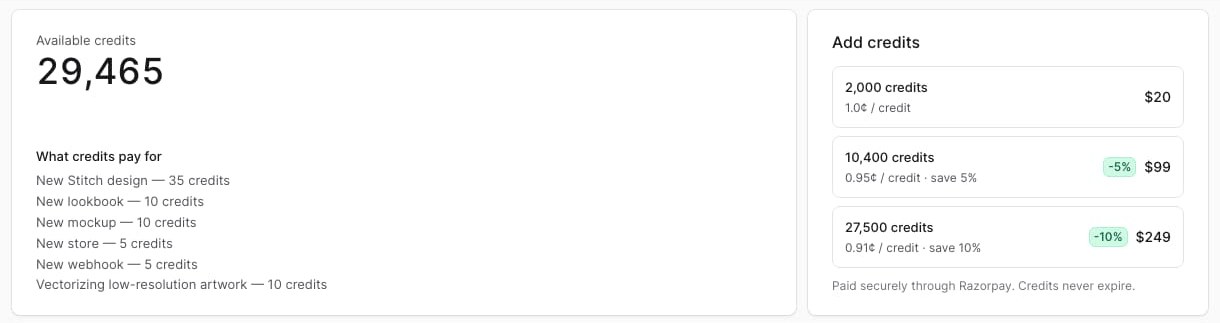
The bigger features, like AI images, embroidery files and extra stores, are paid per use. Instead of a confusing pile of separate fees, they all draw from one credit balance, and Stitch, lookbooks, mockups, stores and webhooks each have a clear price in credits.
Behind the scenes, the wallet works like a bank ledger: entries are only ever added, never edited or deleted, so the full history is always there. Every charge is a single database update that refuses to run if it would take the balance below zero. That matters when two things happen at once: two charges arriving together can’t both slip through and overdraw the account.
The trickiest part was charging for features we don’t fully control, like the lookbook engine. A charge there has to survive the feature failing, so it moves through a few steps:
- ReserveNever below 0
The admin reserves the charge in one database update, which refuses to run if the balance would go below zero.
- Checkpoint
The request carries the charge’s reference. Just before the feature runs, the charge is marked as spent.
- Feature runs
The lookbook engine, which the admin doesn’t control, does the work.
- If it succeeds
The charge is linked to whatever the feature created.
- If it fails
The charge is released, so trying again never costs twice.
- Reserved10 heldLookbook, first try
- Spent10 usedCheckpoint, before the engine runs
- Released10 backThe lookbook failed, so the 10 come back
- Reserved10 heldLookbook, second try
- Spent10 usedCheckpoint, then linked to the lookbook
Rows are only ever added. Nothing is edited or deleted, so the full history stays.
What we learned
- A platform’s limits are design decisions in disguise. Lean into them.
- Only call something “live” when it really is.
- Money code should make double-charging impossible, not just unlikely.
Common questions
What do credits pay for?
The pay-per-use features: Stitch designs (35 credits), lookbooks (10), mockups (10), publishing a store (5) and webhook endpoints after the first free one (5).
Are my integration login details safe?
They’re encrypted at rest with AES-256-GCM and never displayed again after you save them.
Can a failed action use up my credits?
No. If a feature fails after a charge has been reserved, the charge is released.